


Support Ticket Plugin for zeroShop
Simple. Powerful. Integrated. Support that keeps your business moving.
Give to your customers a fast, organized, and professional support experience — while turning every request into an opportunity to build loyalty and recurring revenue. Whether you offer free support to all users or enable paid support mode, this plugin delivers a complete ticketing system with support eligibility, renewals, announcements, and notifications, all fully integrated into zeroShop application.
The Support Ticket Plugin
Turn customer support into a revenue stream — and a reason to stay subscribed.
A complete support ticket system for your zeroShop store, with optional license-based support, renewals, and customer announcements. Give your customers a fast, professional support experience while you turn ongoing support into a recurring, subscription-like service.
Why you'll love it
- Monetize your support. Sell support extensions and renewals instead of giving it away forever.
- Reduce churn. Keep customers engaged with timely announcements and an easy way to renew.
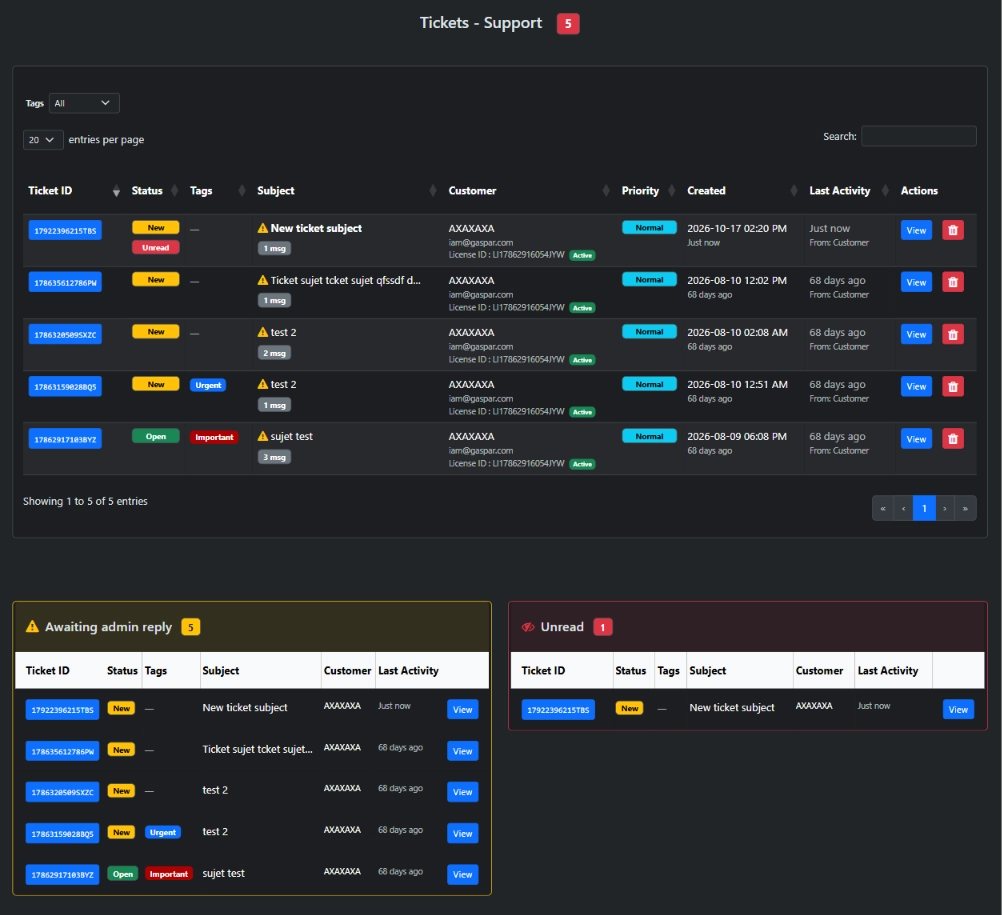
- Stay organized. Tickets, priorities, tags, and unread indicators keep your team on top of every request.
- Zero friction. Works out of the box in free mode, and scales into full license mode when you're ready.
Everything you need
🎫 Ticketing that feels effortless
- Customers open tickets from their account page; you manage everything from the admin panel.
- Reply, close, reopen, and set priorities (low / normal / high).
- Clear statuses — NEW, OPEN, CLOSED — plus unread indicators for both sides.
- Organize with colored tags and filter the ticket list in one click.
- Optional attachments with configurable file types and size limits.
🔑 License-based support
- Mark any product as support-enabled; a license is created automatically when it's purchased.
- Customers can open tickets as long as their license is active.
- Flexible support duration: per option, per product, or a global default.
- Licenses are managed automatically through the order lifecycle — created on payment, revoked on refund, unpaid, or deleted orders.
♻️ Renewals that generate recurring revenue
- Show a Renew button next to each license, pointing to your own renewal product.
- Simple or advanced setups, with duration options (1, 3, 6, 12 months…).
- Optionally send customers straight to checkout for a frictionless renewal.
📣 Announcements (read-only broadcast)
- Publish release notes, bug fixes, maintenance notices, or promotions to your licensed customers.
- Target everyone with an active license or a specific product.
- Rich bodies with basic HTML and downloadable attachments (original file names preserved).
- Customers get a dedicated page with an unread badge and a handy filter.
🔔 Email notifications
- Notify the admin on new tickets and customer replies.
- Notify the customer when your team replies.
- Each notification can be toggled on or off.
📊 Admin dashboard widget
- See at a glance the tickets awaiting your reply — right from the dashboard.
Two modes, one plugin
- Free mode (default) — Any registered customer can open a ticket. Zero setup.
- Paid support mode — Support is tied to product purchases, with durations, renewals, and monetization.
Switch between them with a single setting — no reconfiguration.
Built for zeroShop
- Native integration with zeroShop products, orders, and customers.
- Clean, admin-friendly interface that matches your dashboard.
- Self-contained: ships with its own tables, migrations, and settings.
- Multilingual out of the box (English, French, Spanish, Portuguese).
Perfect for
- Plugin & theme authors offering paid support alongside their products.
- Digital stores selling software, templates, or services with ongoing maintenance.
- Retailers of physical products who want to make it easy for customers to ask questions right where they already manage their orders.
- Any zeroShop store that wants a professional, organized support desk.
Get started in minutes
-
Copy the
SupportTicketfolder into yourzeroshop/plugins/directory. - Activate it from Configuration → Plugins.
- Configure your settings under Tickets – Support → Settings.
Support has never been this simple — or this profitable.
Add a complete support ticket system directly inside your zeroShop app.
Questions about the plugin? Contact our support team.