


Your Website or Landing Page Is Already Doing the Hard Work
Your website or landing page already does the hard work: it explains what you do, showcases your offer, and may even attract potential customers. The only missing piece is a way to accept payments without leaving the page.
In short, you already tell the story.
Now let it generate revenue.
That is exactly what a Buy Button does. With zeroShop, you can add one to your existing website or landing page in minutes—no redesign, no migration, and no monthly platform fees. Here's the full process, step by step.
Before You Start
You only need four things:
- A working zeroShop installation.
- Access to your back office.
- The details of what you want to sell: name, price, short description, and any options.
- At least one payment method enabled.
That is it. There is no plugin to install on your website or landing page, no theme to change, and no product page to design.
What a Buy Button Actually Does
A buy button is a small, embeddable element that opens a checkout directly on the page where your visitor already is. Instead of sending them to an external store, it brings the cart to your content.
For a freelancer selling a consultation, an artisan selling a limited collection, or a small business selling a handful of products, that difference matters: fewer steps, less friction, and a buying experience that stays inside your brand.
Why zeroShop Keeps It Simple
zeroShop is a self-hosted checkout engine. You install it once on your server, then paste a generated snippet wherever you want to sell. It works with WordPress, Wix, Webflow, Squarespace, Joomla, static HTML, custom PHP, and standalone landing pages.
Because it runs separately from your website, it never touches your files, your design, or your SEO. You keep the site you have, and you add the ability to sell.
What that means in practice:
- No redesign and no migration.
- No monthly platform fees or subscription and no per-sale commission.
- A one-time license that you own.
- A complete back office to manage orders, shipping, stock, customers, emails, etc.
Add a Buy Button in Three Steps
Behind the simplicity, there is a complete e-commerce backend. But from your side, the workflow is refreshingly short.
Step 1 — Create Your Product or Service
Log in to your zeroShop back office and add the item you want to sell. Give it a name, a price, and a short description if needed. If it comes with options — such as a size, color, duration, or package — add them here.
Your item can be a physical product, a digital download, or a service. You do not need to build a product page: your existing page or landing page already does that job. You are simply telling zeroShop what is for sale.
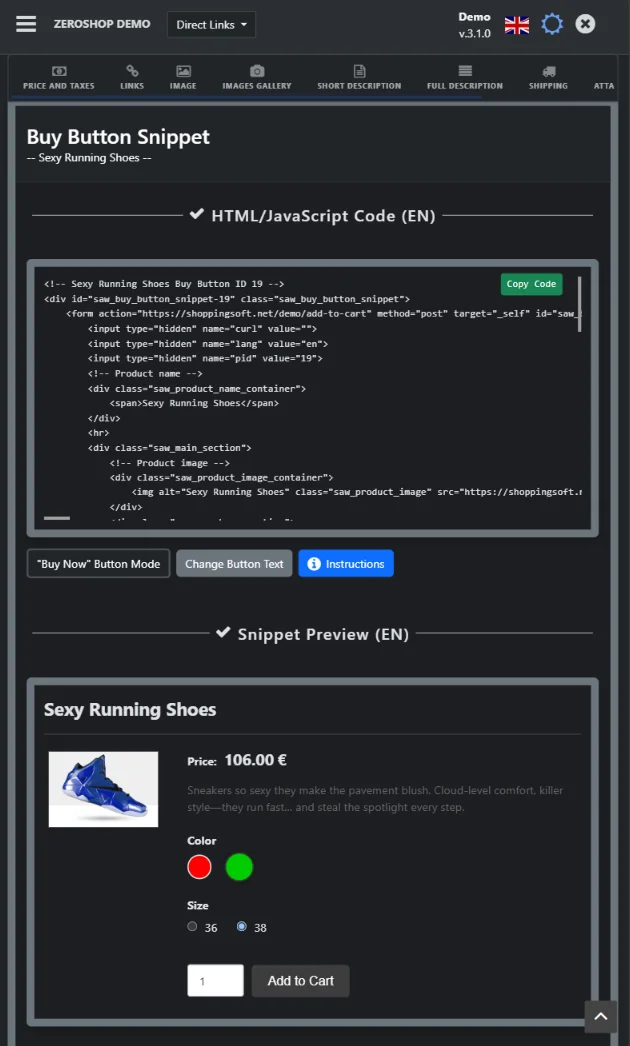
Step 2 — Copy the Buy Button Snippet
After saving the product, zeroShop generates the buy button for you. Copy the HTML/JavaScript snippet, or use the WordPress shortcode if your site runs on WordPress.
The snippet is automatically linked to the product you just created, so there is nothing to configure manually.
Step 3 — Paste It and Publish
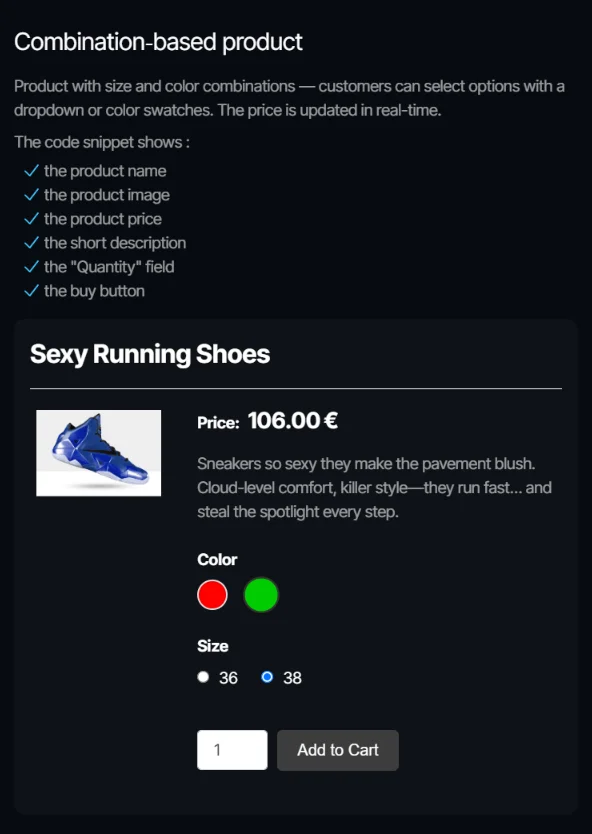
Open the page where you want to sell — a service page, a portfolio, a blog article, or a landing page — and paste the snippet into the content.
Publish. That is the entire integration. The button now matches the product and is ready to accept orders.
A Real-World Example
Imagine a photographer with a portfolio website. She adds a “Book a session” service in zeroShop, copies the snippet, and pastes it into her pricing page. Within minutes, visitors can book and pay without leaving the portfolio.
No new website. No product catalog. No monthly platform fee. Just one page that now accepts payments.
The same approach works for a campaign landing page: one page, one offer, one buy button.
Want to see it before you build it? Open the live demo and click a real buy button.
What Happens When a Customer Clicks
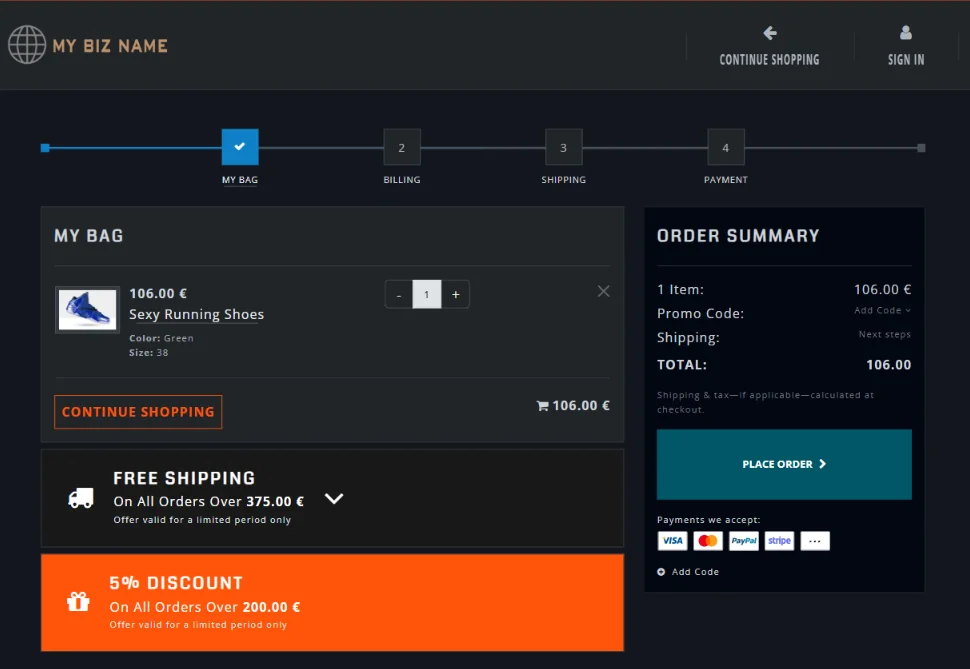
When a visitor clicks the button, a cart and checkout open directly on your page. There is no redirect to a third-party store and no disruption to the buying experience.
Customers can review their order, enter their details, and pay through one of the 10 payment options built into zeroShop — including Stripe and PayPal, plus manual methods such as bank transfer, check, cash on delivery, money order, Western Union, and phone ordering.
You receive the order in your back office, where you can manage stock, customers, invoices, emails, and fulfillment from one dashboard.
Make It Match Your Brand
A buy button should feel like part of your website, not a widget bolted on top.
zeroShop comes with three themes — Default, Dark, and Mono — and includes a CSS Generator that lets you adjust the look without writing code. If you want more control, the styles are fully customizable.
The goal is simple: your visitors should notice the offer, not the software behind it.
When a Buy Button Is Not the Right Fit
Honesty matters more than a sale, so here is the limit.
A buy button is designed for focused selling: a service, a handful of products, a digital download, a workshop, or a small collection. If you sell hundreds of products or services, this model is no longer the best fit.
At that scale, customers need to browse: categories, search, filters, product pages, and large-scale inventory management. That is the job of a full e-commerce platform, not a buy button embedded in an existing page.
zeroShop is built for independent operators who want to monetize the website they already have — not for running a large, catalog-driven storefront. If your catalog is measured in hundreds of items, a dedicated e-commerce platform is the more appropriate tool.
Who Gets the Most Out of It
- Freelancers and makers — sell a limited collection from a portfolio or gallery.
- Coaches, creators and consultants — sell sessions, packages, digital products, courses from a service page.
- Local businesses and artisans — wanting to sell a few products without building a full online store.
- Landing pages and campaign pages — sell a single offer from a page built for one purpose.
- Agencies — add e-commerce capabilities to client websites without a platform migration.
- Small businesses — looking for a lightweight alternative to traditional e‑commerce platforms.
From Button to Business
Adding a buy button is a small step with a large business effect. It turns pages that already attract attention into pages that can accept payments — without redesigns, migrations, or another monthly bill.
You keep your website or landing page. You keep your traffic. You keep your margins. You simply add a way to sell.
Frequently Asked Questions
Do I need to rebuild my website or landing page?
No. zeroShop runs separately and generates a snippet you paste into your existing pages or landing pages. Your design, content, and SEO stay untouched.
Can I use zeroShop for hundreds of products?
No — and it is not designed for that. A catalog with hundreds of items needs browsing tools, search, filters, and full storefront management. A dedicated e-commerce platform is the better choice. zeroShop is intended for focused catalogs, services, and selling directly from existing pages.
Do I need technical skills?
No. You create the product in the back office, copy the generated snippet, and paste it. WordPress users can use a shortcode, and the CSS Generator handles styling without code.
What does it cost?
zeroShop is a one-time purchase with a lifetime license and six months of support. There is no monthly platform subscription and no per-sale commission from zeroShop.